
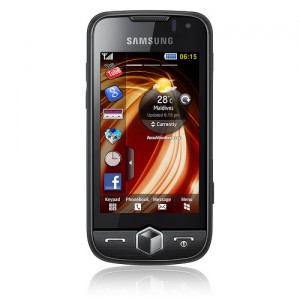
Samsung Jet S8000 was launched with a big promotion with online & television media in India & it is selling good number of units of course, So I thought, it would be great to write atutorial on ‘How To Install Java Games & Apps In Samsung Jet S8000′ We have recently partnered with best of samsung geek’s forum & this article is published with their support.
So lets get started with the step by step procedure.
Steps To Install Java Games & Apps In Samsung Jet S8000
Remember the rule of modifying your phone – Back Up Everything you can with PC synchronisation. (This is not that hard but still, precaution is better than getting screwed up)
Update: 19/4/2012
Notice : Download Links Are Permanently Removed, We Regret for the Inconvenience.
1. Install TKFileExplorer. In the same .rar file, open SAMSUNG_Composite_USB_Driver_4_34_WHQL.zip and choose the Setup.exe file. This will install the necessary Samsung Driver to use TKFileExplorer.
2. Open TKFileExplorer and go to Settings then choose COM. On port, click the drop down menu and choose the port that is visible (something like port 5/port 6).
NOTE: you must NOT be connected in pc studio. Now click on FILE and CONNECT.
3. On the bottom half of TKFileExplorer, browse through these folders Exe/Java/Games. Now that you are in games, create a new folder. Name it after what you are going to install (for example, Google Maps, Gmail, Opera Mini etc).
Now you will need to place the .jar & .jad files of the program you will be installing. On the top half of TKFileExplorer, browse through to where you saved the application files (.jar/.jad) and select them both. Now right click and choose “Download”.
4. Open up your dial pad and enter the following, *#5239870*#. Choose INTERNALS and enter the following, *#7092463*#
Now scroll down and choose Storage Settings. Then update Java DB, followed by update apps database. Now you are finished.
Go to Menu> Applications > Apps & Games. The new program Must be listed there.
Have Fun !!!
If in case you do not have updated Samsung New PC Studio Here are quick links for download
India http://in.samsungmobile.com/support/softwaremanuals/softwareUpdateMain.do
Dutch http://www.samsungmobile.de/support/softwaremanuals/softwareNpsUpdate.do
Singapore http://www.samsungmobile.com.sg/support/softwaremanuals/softwareUpdateMain.do
UK http://www.samsungmobile.co.uk/support/softwaremanuals/softwareNpsUpdate.do






10 Responses
thnx for this…can u provide me 4 samsung star wifi gt s5233w…plllzzzz
Thanks for the info. However, I can complete all the steps successfully but nothing appears in my Games folder. I’ve tried updating the Java Database, Media Database and Apps Database but nothing. I am uploading both the jar and jad files.
Any ideas? Thanks
save as
user/mass/java/games
This all works fine until you get to the “Go to Menu> Applications > Apps & Games” bit. There is no Applications listed on the menu of a Samsung Jet S8000; at least there isn’t on mine.
Found a solution thanks to ChrisK on Darkforestgroup.com. Follow all the instructions above as before but use “User/Mass/Java/Games” folder INSTEAD of “Exe/Java/Games”.
Also, make sure you install both .jar & .jad files. You can convert .jar to .jad using JADMaker, just Google for it.
When you have everything installed go to MENU > GAMES & MORE instead of Menu>Applications > Apps & Games and the games will be there.
I’m running windows 7 64bit and i’m having some trouble installing the driver.
If I Search in the exact folder of the modem driver (where I unpacked it all) windows doesn’t even recognize it. So I can’t install it on my computer.
Could someone help me please? Thnx!
please if possible please give web address to find games in jar & jad type
and also some other softwares
thanks
i have games and type of files are jar they are not working in samsung s8000 how should i install them please show me the why
thanks
please semd me email in [email protected]
i have done everything but when iam going to open my download folder there is nothing even in navigation its shows nothing there and it says that i most have route 66 synce in cd or dvd …. dont know what to do 🙁
hello dear,
plz tell me about my samsung s8000 jet installing full touch screen games.