
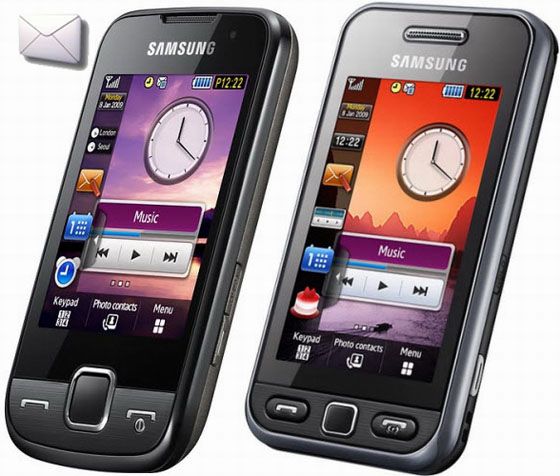
Here is a quick tutorial of configuring Samsung Star S5233 / Star 3G S5603 & S5600 Preston /Star Wi Fi for setting up the email client inside the phone with its POP3 Settings for Gmail.
NOTE : VERY FIRST ENABLE POP3 FROM YOUR GMAIL ACCOUNT SETTINGS. LOG IN TO YOUR GMAIL ACCOUNT > ON TOP RIGHT CLICK ON SETTINGS >THEN CLICK FORWARDING & POP3 > THEN ENABLE POP3 FOR ALL MAIL OR YOU CAN SELECT OTHER OPTION. BUT AT LEAST POP3 MUST BE ENABLED. THEN SAVE CHANGES.
POP3 Gmail Settings For Samsung Star Cellphones:
Go To > Menu > Messages
Click Settings > Email
Then Touch >Email Setup Wizard
Notice will ocuur Touch > OK
Give name to your account E.g Gmail
Enter your email id : [email protected] , Then Enter Password for your account.
Incoming Server type : POP3
Incoming Server : pop.gmail.com
Outgoing Server SMTP : smtp.gmail.com
Secured Connection : Off
Then touch OK & it will display your POP3email account configured successfully. Now press back button and tap on Email Accounts, then touch the email account you have just created. There some more option than above you just have to edit that.
Secured Connection: Off
POP3 Port: 995
SMTP Port : 587
Now, Tick The option APOP Login.
Download Limit: 500
Secured connection: SSL (Choose SSL for second option only & not for first option.)
Retrieving Option: Choose Subject only
Keep On Server: Tick
My Address: yourname @gmail.com
Username /Password : same as you entered above
POP before SMTP : Dont Tick
SMTP Auth: Tick
Same as POP3/IMAP4 : Tick
And Finally Save All Settings.
That’s it !!!, Now you can retrieve your message from your mail box & Click on Download to download all messages.
But , Do you want your Samsung star phone to automatically download your messages ? Here is a small option they have given for that.
Go To Message > Settings > Email > Receiving Options
Download Limit: 300KB
Auto polling: Home Network Only
Following option is time after when email is downloaded automatically.
Polling Frequency: 30 Minutes (you can choose higher if you want)
Send read report: Tick
And again your emails will be automatically recovered from server at every 30 minutes. And you’ll get notified near your message notifier on your home screen if there is any unread emails.
You can also optionally block email id’s or subject that you don’t wish to receive on your Samsung Star.
Let me know if you come across some problems. I am also trying to setup with IMAP functionality & will inform with new post. till then enjoy your emails on your Samsung Star, Star wi fi,Star 3G/ Preston 5600





320 Responses
how abt yahoo id ?
You can also configure yahoo id , just you have to replace pop & smtp server as well as there port numbers
HI Dear
Thanks for the above material as it has really helped me to establish a gmail account in my Samsung Star 3g,but i have a one more request to you that pz illustrate for yahoo mail account as well so that i ll be able to create yahoo account too in my cell.
Plz let me know how u configure gmail in Samsung Star GT-S5233S phone. When i am sending any mail it’s gave an error message “Sending Failed”.
These settings worked for almost 70% of people, so there is strong chance you are entering values at wrong places. Follow the instructions properly. Settings are same for all mobiles of star series
Did you manage to sort this error? I’m having the same problem.
how about hotmail or live.com
How, pls tell me.
i cofigure the email inbox in my samsung mobile star 3g 5603 but there is a DNS error. pls help me how i will receive the mail in my mobile email inbox. i am ussing Reliance Smat connection.
i configured the account as u have told brother. but when i start downloading the mails… it says DNS error
i configured the account as u have told brother. but when i start downloading the mails… it says DNS error, kindly help
I did all the steps that you mentioned but when I start downloading, it says “CONNECTION FAILED”. Can you advice what may be going wrong?
I am able to access normal internet from my phone using Airtel Live Settings
can you be more specific abt the port no and server numbers …!!!! i am stuck
Check out this URL and use the values of POP servers & port numbers on your smasung cellphone. Just replace the gmail pop & smtp with these values
Hi i have to load yahoo mail too can u please help me with it i have just uploaded gmail and thanks
what url?!?!? i keep confirguring my email and the response i get is that the Id or password are incorrect, but i doble checked them on my pc and they are correct.. what is wrong?!?!?!
Hi,
I have samsung star 3g, i used the same configuration as mention but it isn’t working i have Airtel connection..
Can you help me with this.
it works dude … just try one more time … i got the same connection .. it worked for me …..
i spent a whole day configuring my samsung 3g email settings and with your blog help done in second try with secure connections ssgl settings 2nd option thanks a ton a million.Best blog to help others
You are always welcome
and ppl!!! i updated ma phone firmware it works and installing application becomes simple … go to arunorvic.tk and try updating yo firmware.. its kwel!!!!!!
with this setting incoming is working but unable to send or forward messages. Showing “sending failed”
You need to edit the smtp settings, Change it again as given here in the post.
Thanks dear, but i have mentioned same smtp setting as indicated by you, but still not able to send mail. ( Gmail )
I’m having the same problem. was able to receive e-mail but when i try to send i get a message saying sending failed! what should i do?
i also having this error
i tried it 100’s of time ,
but i am not able to do
what to do ?
can we configure this receiving emails to use wifi connection? not 3g or gprs
its saying Gmail-DNS Failed,when i start downloading mail..could u help?
failed in yahoo dns please send me yahoo email satting for sam gt-s5603
Thank you. It works. 🙂
I’ve been confused with setting up the gmail on my Samsung Star, but these steps are just perfect. ^^
Thank you!!It works!You’re great!
Hey Amol..
YOU ARE AN AMAZING GUY !! I seriously can’t thank u enough for the stuff that u’ve posted here.. I was so let down by my phone that i actually atopped using it for a while, until i chanced upon ur blog !!
Do me just one more favour dude.. PLZ POST SOME GOOD GAMES FOR SAMSUNG STAR 3G OR MAIL ME THE UNLOCK CODES OF THE EXISTING CODES..
I’ll BE REALLY THANKFUL TO YOU..
whenver i send a mail i am getting a Gmail:no Response
i am using samgung star.and my connection is vodadone.
kindly help.
Then you might have configured SMTP port wrong. Please check the SMTP posrt is same as I mentioned in post.
cool,
I succeeded in first attempt.
thanks a ton
please give a method for yahoo also.
thanks again.
Hey
Well first off thanks for the wonderful tips. Getting to the point, everything works but I have a small query. Is there a way to stop the phone from downloading all the mail off the server. I just want to receive emails that i haven’t read yet???
Hii Adi,
For that you need to configure Gmail IMAP settings not the POP3
Hi Amol,
Thanks for this wonderful tutorial. I followed all your instructions and got the following message:
!
Gmail:
No response
(OK)
Would appreciate if you could please guide to do things right. However I downloaded gmail for mobile, which works just fine.. but it doesn’t alerts when new email arrives. That’s why I need push email.
Have you forwarded the Gmail POP3 from your Gmail account settings?
iam using sam gt-s5603 and my connetion is air cel my problam is yahoo mail downloding failed or invalid password or id kindly help
Have you forworded the Yahoomail from your yahoo account settings?
I have a samsung star with wifi, do you think you can help me configure it for windows live/msn? It keeps saying “connection failed”.
I didn’t got your question dave, are you connecting msn on yout star wifi ??
Pls help me. i have saved all the setttings but when i touch download then connection failed appears…
plssss help………
Hii can u help me loading yahoomail in my samsung star i just finished uploading gmail thanks
Hii can u help me with loading yahoomail and thanks for gmail i just uploaded It and if possible in mail too
would wait for ur reply
thanks
I have put in the settings that you specified above but i still get gmail no response on my samsung star.what shouls i check? or what should i do iam stuck.Thank you.
hi. i have the samsung s5233. do you have the t-mobile (us) wap and mms settings for this phone too?
Sorry Jason,
I am operating things from India & WE dont have T Mobile here, so I cant give you T mobile settings. But you may get things done here at my partner website which is global http://darkforestgroup.com/forum
Hi i followed all your instructions to setup email on my samsung star s5233s and i can recieve my email.. but it keeps downloading everything from server? i just want my new email and secondly i cant send email it keeps saying failed? could you please help?
Dear Sir,
I have got a BSNL connection and rediffmail account.I have done everything as advised by you.Still I am unable to download/receive my mails.Every time I receive a message ‘DNS Failed’.Please help.
Please can you give me the exact settings to setup Hotmail on my Samsung star. I’ve tried many settings but they all say “Hotmail: No Response”.
PLEASE HELP!!
Dear sir,
i have a problem when downloading my email incorrect Id and password .can u help me And also a message says
‘invalid server’
CN=smtp.mail.yahoo.com/
OU=yahoo/ O=yahoo!Inc/
L=santa clara/
S=california/
C=US
U can tell me how to solve that problem
I have configure all setting of Gmail. But when i am sending any mail by give error message “Sending Failed” Plz help how i can configure
These settings worked for almost 70% of people. Follow the instructions properly.
i have samsung star 3g nd i want to know how can i put my message memory from phone to memory card as default!!!!!!!!!!!11
Dear Sir,
I have got a vodafone connection and yahoomail account.I have done everything as advised by you.Still I am unable to download/receive my mails.Every time I receive a message ‘DNS Failed’.Please help
When i try to configure gmail account, it says connection failed. Can you pls help me ??
These settings worked for almost 70% of people, so there is strong chance you are entering values at wrong places. Follow the instructions properly.
VERY FIRST ENABLE POP3 FROM YOUR GMAIL ACCOUNT SETTINGS. LOG IN TO YOUR GMAIL ACCOUNT > ON TOP RIGHT CLICK ON SETTINGS >THEN CLICK FORWARDING & POP3 > THEN ENABLE POP3 FOR ALL MAIL OR YOU CAN SELECT OTHER OPTION. BUT AT LEAST POP3 MUST BE ENABLED. THEN SAVE CHANGES.
i m still getting “no response” when i try to download mails…….i did everything what u hav mentioned, i hav even enabled the POP frm my a/c…..plz help
regards.
Hi thanx a lot i configured my gmail account will u plz send me the same for yahoo account
The gmail inbox works great but in sending mail with multimedia attachments it shows connection failed,and for hotmail the sending failed wether with or without attachment.
Try to configure smtp server & port id again.
Dear Sir,
I’m using Yahoo and I don’t know anything
on how to configure Yahoo mail on my email
settings for my Samsung S5233S. It’s
really frustrating, can you help me as
soon as you can?
Yahoo needs paid a/c subscription. I don’t have any so I cant test it for your. Sorry
How to configure rediffmail to sumsung mobile phone 3310
when am connecting my sumsung Star-3G mobile to my PC
am not able to exporting my cantact y?
how to do it?
Use PC studio mode to connect Star 3G to PC. Then Synchronize phone with computer to transfer all messages & contacts.
what’s pop port no on yahoo id
Amol i don’t have gmail id i have only Yahoo id can u tel me The Yahoo port no.
Dear Sir,
I have got a IDEA connection and Gmail account.
I have configured everything as advised by you.Still I am unable to download/receive my mails.Every time I try to download mails it says ‘DNS Failed’.
Please help……And yes all the configuration are accordingly to u still no results.plzzzzzz help.
How do you install hotmail emails on you phone???
Hi,
I did as you mentioned but I get “Connection Failed” or “Gmail:No response”. I checked but no mistake in settings. Is it because i dont subscribe to Vodafone Mobile Connect (India). I have the free GPRS where i can surf etc basically use the browser.
plz send games for samsung 3g star phone.and also send other application……..
Hi,
I am using S5233S,,and I follwed the instructions you mentioned above..I get connection failed error..I tried it a lot of times and with Airtel and Vodafone both..can you pls advise where am I going wrong
hiiiiiiiiiii
I m Having Star S-5233w (wifi model)
Any java appn downloaded frm net.. is nt working
will u pls help me ?????
plsssss
Can u suggest me any website for free game & software..
NOTE : VERY FIRST ENABLE POP3 FROM YOUR GMAIL ACCOUNT SETTINGS. LOG IN TO YOUR GMAIL ACCOUNT > ON TOP RIGHT CLICK ON SETTINGS >THEN CLICK FORWARDING & POP3 > THEN ENABLE POP3 FOR ALL MAIL OR YOU CAN SELECT OTHER OPTION. BUT AT LEAST POP3 MUST BE ENABLED. THEN SAVE CHANGES.
hey, i have a question.
is this charges? and are this able for all star model?
There are no charges for POP3 access on Gmail & It is chargable in yahoo & rediffmail.
Hi Amol,
Do you have ny idea abt Samsung NPS for windows 7?
its usefull for us your information.
Thanks a Million.Your Gmail setting worked in my Samsung in 1st attempt. Plz tell me will same setting work for hotmail.
Amol thanks a lot. I am able to recieve the mails. I am still unable to send. I have checked all the entries numerous times. smtp port is 587.
Is there something else that has to be done. Something in the sending options??
Regards,
Srikanth
Tick the SSL option on
Thanks amol I managed to get it corrected. Below the smtp port there is any option for secure connection. If that is also turned to ssl mode the outgoing mails are sent. May be this will help others.
Thanks anyways.
wat are the settings used for setting up the yahoomail on my samsung s5233/helpp
I have configure all setting when i am click on download mails then it show message “DNS Failed”.
Please let me know what seeting i make
Rgds,
Hemant Maurya
Tick the SSL option
Hi im using samsung star 5233 iconfigrd d setngs as postd bt shwS DNS fail,do weneed suficient balance 4diS.is it free
Please Tick the SSL option
i followed all your instructions (samsung F480) but it keeps telling me connection error… can you help? ;o((
Just Tick the SSL option
Hello everybody!
I’ve bought a new cell-phone Samsung s5560 with an Push e-mail option. But when I switch it on, I still don’t receive any e-mail on my phone.
Can you please help me to configure it correctly?
Thank you.
Hi i’m usig Samsung Star S5233 and try to config my office email account. i used the same port numbers.but it throws an error connection fail
I’ve already made Gmail setup on my Samsung star GT-S5233A, exactly the same of the top steps, when i’m choosing Download emails , message appears “Connection Failed”
kindly advice
thanks
thanks very much amol,,,, jay maharashtra,
pls send me on my mail id ..new wallpapers, rediffmail, yahoo settings…. and new softwares..
my mobile is GT-S5603, my no. 9922911085,
pls send me
jay shivaji jay bhavani
how can i install samsung star 3g s-5603 thiem
bought a new cell-phone Samsung star 3g s5603 with an Push e-mail option. But when I switch it on, I still don’t receive any e-mail on my phone.
Can you please help me to configure it correctly?plss
sir
pls help me
i cant send mail from my samsung star 3g gt-s5603 bur recieving is ok . when i try to send its reply sending failor.pls sir post me [email protected] at this e mail adress i want to know also yahoo mail use in my phone.plssssss
Thank you for you response at Anna
May 4, 2010
Hi Amol,
Thanks for this wonderful tutorial. I followed all your instructions and got the following message:
!
Gmail:
No response
(OK)
Would appreciate if you could please guide to do things right. However I downloaded gmail for mobile, which works just fine.. but it doesn’t alerts when new email arrives. That’s why I need push email.
hi.., i ve followed ur instructions exactly as posted above 4 gmail but it doesn’t seem to work as it always shows as either connection failure or as no connection..! please help over this.. thanks
hi i have a samsung monte s5620 what are the settings for a aol account and will it be free if connect through wifi ?
Thanks a lot. your direction is clear. Just to share my experience, i have stuck with yahoo id, since maybe its only work for yahoo plus. but you can trick it with forwarding your yahoo to gmail account (you can find it on yahoo email setting option > more option > pop up and forwarding > forward your yahoo mail to gmail address). You have to creat gmail adress for that. it work for me. good luck!
These steps just doesn’t work for me on samsung f480. I have bsnl connection, do one have to enable anything from bsnl side?
hey man….gr8 thng…
thnks….i configured gmail…n it works osm…
bt i want 2 config rediffmail as well…
hi i did exactly as you Ve mentioned in t procedure but when i click on download it says “Gmail:dns failed” i use samsung star 3g S5603.. can ya help me out pls..
hai
Hi,
Please provide pop,smtp and ports for yahoo.com. Most of the people still asking for it. or you may provide the complete configuration for same.
Thanks
Pankaj
its the same config… u just have to edit the gmail to yahoomail.
Hi,
How I configure mail from office exchange server for Samsung 5233 mobile.
Thank u very much.
Hi. I am grateful for helping me in my problem regarding sending emails thru my celpphone. I have tried entering this settings but I received a message of connection failed. What sam I doing wrong? Does this settings work with yahoomail also. thanks
I have just bought samsung monte. by applying the above options i still cannot download messages. can you suggest settings for the same. my current location is india. i have a wifi that i successfully use on this mobile and hence disactivated my gprs facilities.
Samsung corby shows dns failed .help me
Yes it does.
Hi,
I am using Samsung Star(S5233) wi-fi, i am using internet connection with wi-fi… i tried u r settings but it’s not working…
Hello,
I have configured according to steps u have listed.
Still I get the connection failed error during download.
Any Ideas on how to solve the error.
brow kok gx bisa di download???
dmana’a yg slah setingan gw??
I didnt understand your language, please try some English words
Hi Amol, I have a samsung monte and Im tryng hard to configure gmail. I have been able to setup email through Activesync but i wanna set it up through the email inbox that we have.. I have tried these options with all the editing in the ports but i get an error connection failed. any suggestions, plz let me know, Thanks!!
Have you enabled POP3 from your settings page in Gmail ???
Samsung Wave
Google:DNS Failed error while configuring gmail
Settings same as mentioned in post above
Any solution?
Hi,
I tried the settings and it is working fine on wi fi but it is not working on my Vodafone live. pls help:)
Thanks a lot bro.. It’s Work at my Phone ‘Samsung Monte GT-S5620’ I can send and recieve email with my mobile phone now…
If u wanna setting pop and forward mail message 4 Samsung Monte, Please visit my blog ^^b
http://shiromundo.blogsome.com/2010/07/07/setting-pop-forward-mail-google-dan-yahoo-di-samsung-monte-gt-s5620/
Hey…buddy….
i have samsung monte….have u been using for quite some time now…..until yesterday my wi-fi was working properly…..
and since today afternoon…i have been getting dns failed error…i m not able to open any pages….
Pls help….!
i cant istall java software in s5233s so tell me how 2 install
hi,,,
I use samsung star GT-S5233w,,i can connect with the wifi,but a can’t browse,,
Do you have some manual setting for wifi,??
thanks,
Tried this with Hotmail (found settings on the internet), but it won’t work in any way. It doesn’t even mather which port, ssl/tsl on or off, etc…
Doesn’t even work with Gmail…
Please make sure your POP3 settings are enabled from your gmail account
I Googled a lot, and I’ve tried at least 10 kinds of POP3+SMTP and 10 of IMAP4+SMTP settings, none of them worked. Yes, I am sure I enabled POP and IMAP in GMail.
I am sure that my connection is good, because I can use all the other internet based things, like the internet browser and GMail’s J2ME/Java app. But I want my phone to alert/vibrate when I got an e-mail…
Even when I Google Hotmail settings it doesn’t work.
Another thing I’m sure about is that GMail and Hotmail are configured well. I can use both in computer software, like Outlook and Firebird.
Please make sure your POP3 settings are enabled from your hotmail account
What I forgot to put in my last comment:
Each time I’m trying something from the internet, my Star gives another message: sometimes about DNS or the connection, other times about ‘unanswered’ server things…
please also guide for the Hotmail account setting on s5620
i have tried alot but not working out for
i keep getting the error ‘connection failed’… i have enabled pop3 in gmail settings… my gprs is active… pls help…
I am having exactly the same challenge with the Samsung Corby TXT GT-B3210. Can this work for that too? Please help.
Thanks a lot.
Satr 3G doesnt have push e-mail facility. FYI
No
I am facing problem during the sending from my star 3g phone
Hi Amol u r a genius, what about the yahoo mails man can you plz help me
Hi,
This is Ganesh Here. I would like to configure hot in my Samsung GT-S5230 mobile.
Please provide the Guide line for the same.
Kindly do the needful.
Thanks
Hey, wonderful explanation. Works brilliantly. One small problem though. Im able to recieve my mail but cant send any. can you help me?
Change your SMTP port number
i followed your steps and a window keeps popping up as define e-mail profiles
please help.
thanks
You have not saved your email configuration then
Please send me, gmail pop3 settings for samsung s5350.
Above settings apply to all samsung models
kalo setting email utk samsung monte gimana ya..???
Hi Amol
I was able to configure gmail on my s5620 Monte
it worked. but it is downloading mails from my gmail account from 1st jan 2007. and i have thousands of mails in my gmail account.
is there any setting through which it will only download current mails
thanking you in advance
Go to Gmail Settings then POP3 then And select Enable POP3 only for message arrives from now on. (Or new msgs) SAVE it
hi dude,
well all the best for next work you wsh to try,but please help i am already make the connection as per ur directions, but when i m going to connect or download m mails then it says no response, so please guide me
hello,
also please suggest me how i can configure m yahoo account
Hey,
Could you tell me a method of how to browse internet on my new GT-S5620 phone using only Wi-Fi. I do not have a data plan so I will rack up extra costs if my internet connects to my cell phone provider. I want to only access local wifi hot spots. So can I permanently block non Wi-Fi browsing?
Robert
Hi! I have a problem uploading my photos using my e-mail account on my Samsung S5233T I followed ur instructions on how to configure it but still it would tell me DNS failed,what should I do? thank you, and hope I’ll hear from you as soon as possible.
hi frens . . . .even i had a problem in sending email though had set up the wizard as stated . . . but then when i changed the first secure connection to” ssl” it started working . . try it guys it may work for u 🙂 n thank u very much anmol………….
thank you for advice, now it works;)
Thank you, Shashi. It’s working now. 🙂
Hi,
I have samsung GT-S5560 phone, can u please help me the configuration settings.
Thanks
Geetha
Dear geeta just open google and write here email setting for samsung then u can check the setting of your handset
thanx & regards
M Umar Zia
00923217030715
SAMSUNG BSNL 2G AND 3G NET SETTINGS
Listen friends, i know how to connect internet from Samsung s5603, s5350 and many more____
Just follow my simple steps happily——–
Operations to be done in Samsung mobile:
1- Go to MENU > SETTINGS > APPLICATION SETTINGS > BROWSER PROFILE > create > write BSNL 3G in place of connection o1 > write bsnlnet in access name > save it and set it as default.
Operations to be done in computer:
1- Join your mobile with your computer and run pc studio.
2- Click on widgets in pc studio and don’t touch your mobile as it may be angry.
3- Click on internet connection
4- Click on add and complete following requirements connection name>>>>>>>> BSNL 3G
COUNTRY>>>>>>>>>>>>>>>> other
Network provider>>>>>>> other
APN name>>>>>>>>>>>>>>> bsnlnet
Phone no>>>>>>>>>>>>>>> *99**1*1#
5- Click ok.
6- Click yes.
———-A small help to you from ————-aditya dixit, India——email id: [email protected]
i have s5560 too.this configuration working on my phone, i can recive mail but cant sent:( (DNS faild)! please help
hi
i was able to configure gmail.
but i have a problem
when i start download the mails are getting downloaded from 1 jan 2007 and i have thousands of mails there
how to configure to receive only latest mail
thanks in advance
I configure the email inbox in my samsung mobile star 3G 5603 but there is a Dns failled. please help me how i will the mail in my mobile email inbox .i am ussing BSNL 3G connection
Turn on security mode : SSL in both pop3 & smtp
Saya punya SAMSUNG MONTE yg bru di software ulang….
Nah untuk settingan internetnya hilang smua….
Gmna ya SOLUSINYA…
pls tell me how can i upgrade my star 3g samsung phone . i want to record my calls with my mobile is it possible after upgrading ? i mfound u r the best in this fild pls halp me!
i am from India-Hyderabad ,pl. help me insetting yahoomail settings for my Samsung Omnia HD i8910 phone..thanks n byeee
hi anmol .
Thanks for such help
But whenever i am doing this setting its says either network failure or dns fail.
also tell me how to increase inbox msg capacity in s5603 handset.
please help me as soon as possible
I setup my Gmail account as stated above but whenever I try to download mails there is an error message of “connection failed”. Please help me!
do you know how to configure a yahoo account?
How do i browse the internet using WIFI connection only????
my mobile samsung star 3G s-5603 call records not function but how to recording pleze reply.
my mobile Samsung star 3G s5603 please help how to call recording. call recording is there but not recording please help.
hi can u help me please i try to download gmail and every time it tell me gmail invalid password or id. help me please.
thanx
Namaste
look at:
How To Configure Samsung Star(S5233)/Star 3G (S5603) For POP3 Email Settings
on
https://digitalconqurer.com/gadgets/samsung/how-to-configure-samsung-stars5233star-3g-s5603-for-pop3-email-settings/
Make sure that your second (POP) secure connection will be set to SSL
and first (SMTP) to OFF
Rajko
Thanks Rajko
I used all u said for setting but i says DNS Failed
I want to configure the email inbox in my samsung mobile star 3G 5603 but there is a connection failled error. please help me .i am using Vodafone connection.
security mode is SSL in both pop3 & smtp.
I fllowed every step as provided by you 4 my *3g-5603 4 recieving email but i cant sent email with this setting i am using bsnl connection. plz help me out
man i ve done all th instructions but it says: hotmail:Invalid password or ID…
im using mobinil(carrier) Egypt
wut can i do ??
plz help me..!!
just use the ID of Gmail then your handset accept the other setting and configure your Email account
Hi friend. my mobil model is s5600.i can retrieved the emails.sending failed and saved Outbox itself,when i send email. please help me
hi ,
i have samsung s5233 .some time it show conection failed.
used all u said for setting but i says DNS Failed
Please send me cofirugation to,connect samsung s5233s internet to pc i have vodafone live net connection . please please please help me i am trying it frm 1 year……
Hi!
I have gt s5233s and a tatadocomo connection. I m not able to do internet on my PC through phone. I can do internet on phone properly. Please help.
terima kasih – thank you
Hi
l have samsung jet,i have done all above seting,but showing dns.failed,
i tired alot,but in vain.pls help.
change POP port & check if it is as per instructions
I TRIED SEETING UP MY EMAIL…BUT WEN I WANT TO DOWNLOAD THEM IT SAYS DEFINE E-MAIL PROFILES, THEN WHAT DO I DO NOW…
I am having Samsung Jet i did same all as above but when i click on download it says Gmail No response ? what to do
and ya i had setup gmail in my Outlook and it works fine.
hey Frends….. i m try to set my hotmail id to my cellpheon but its nt working sooo tell mee any one how i set my hotmail email id to my samsung star ……..
best regards
fahad
woohoooo it worked…. at last i could get a right site where i can get the settings for my phone correctly… thanx to the admin who posted this thread… can u plzzz tell me a way how i can configure my yahoo settings also…. thnx in advance awaiting your reply….
kailan bay may load?? para mka email ako gmit ang fone ko (s5233)?
Dear can u plz suggest me dat how can i increase d message memory of my fon gt s5603 (samsung star3g)?
Not possible
Hi!! I hv samsung s5603 i want orkut application on it. plz send me the correct working link for it. thanx in advance.
Please can anyone tell me how can i configure my Rediffmail Account in Samsung Star Phone???
thanx friend becz of U i can Excess my e-mail on my phone….
how to configure exchange mail “not POP3” on samsung star wifi?????
I download emails from hotmail but i can not send email from samsung star mobile. Please help me in this regards.
Hi, i’ve been trying to configure this for a while, but nothing seems to work…
I am able to retrieve my messages fine, but everytime i try to send I get messages such as “No response” …and then if i change my smtp to off then i’d get “Sending failed. Message … outbox”
I’ve tried a few different smtp, like 25, 465 (well 4 something can’t remember xD)
I’ve tried turning on and off, i’ve tried gmail and hotmail …
Would really appreciate it if you could help me here ><
Samsung Star – on Virgin prepaid
When try to download…Error Connection fail.
Wats i suppose to do…
hi we dont have pop/imap enabled on my enterprise, please let me know is there any other way to configure e-mail in my Samsung GT M5650. please help me
I used all u said for setting but it says DNS Failed
Thanks for the info, worked first time!!
Cheers!
Hakan
gmail Configured. Thanks. But downloading all mail since 2007…
Not able to retrieve emails of size 1M. Please help.
this settings are not working on my mobile. message belows Gmail No response. Pls help me.
Thanks
Thx , (y) good work
Hey Amol i want 2 use the oxford dictionary, download accelerator, and an freeware antivirus on my samsung star GT S5233S so plz if u could help me out on these topics
Thanks..It works great bro !!!
Just, for your CONSIDERATION… Do you have tips on HOW TO SETUP SYNC / ACTIVSYNC in the samsung GT-5620 ?
Will highly appreciate it bro..
Will publish article on it soon, please wait for a while
The same is not working for my GT S5560, GIVING ERROR “CONNECTION FAILED”
Check your connection settings…
Thank you so much. It is working.
I still can’t get my emails – everytime I get to the point to put the incoming server, I put this in and then I get screen with exclamation point saying must put in smtp server and won’t let me go any further. It is infuriating.
Hey dude,i do d same as u told.thanx 4 dat.bt there is msg says “security alerted “.what should i do ??? i am bit scared.n my phn is samsung star 3g(preston) can u tell me whether there is any flash player or any software smthing Like that that can play ny video format for online streaming.n if there is any then how can i download it ???? plz mail me.thanx
Dear Anmol,
i am getting error while loading mails i.e, dns failed. Please help me out yaar
Ravi
+919883580034
Dear Anmol,
i am getting error send picture, dns failed. Please help email me the steps. [email protected]
thx
rama
Hi Amol,
I tried following the steps suggested by you but it is saying ” Define email profiles “. Kindly suggest to overcome this problem.
Can I have your email id. Mine is [email protected]
hi man this website sais these settings are for gmail and yahoomail. ive punched in all these settings for yahoomail and its not working
please help
Me email send nahi kar pa raha hu.send fail error aata hai
Check SMTP server and port
hi ive done all that youve sed to do and im recieving my emails but i cant send any emails? what do i do? please help me
Check the smtp port & address
Perfectly worked. Thank you very much.
Thanks for the information, But I am looking for some thing different in my Samsung Star GT-S5233A, I am trying to access the exchange server in my mobile , but my mobile restart automatically when I tried to access the exchange server i.e. http://mail.mycompany.com/exchange/.
one more thing, my friend used to access this same exchange server in his (HTC) mobile, but I am not able to do so.
Please advice what can I do next.
Thanks
Kaushik
It is not available in your cellphone
I am not able to download the emails. It is showing ” Define email profiles “. Kindly suggest.
Change POP3 server & port id as said in article.
Hi Amol,
Thanks for the reply. I already set the same port for pop3 as mentioned in the article but still it is giving the same error.
Kindly suggest.
Regards,
Tanmoy
I tried using the IMAP settings from gmail itself and kept getting the “login failed” or “connection failed” error messages. Once I used the POP3 settings given in this post, it worked first time! Many thanks!!
i am facing the problem S5620 email applications. will any one help me out to installed the my GMail accounts.
Hi,
This is extremely useful. Thank-you for the help. Appreciated :o)
Regards
Abhishek
??????????????
Hi Amol,
Please provide setup for rediffmail. I am using samsung star gt s5233s.
Please guide..
For those that have set up GMail and are happily downloading mails but can’t send, try changing the SMTP Port to 465 and click on Use SSL.
Hope it helps. Otherwise, instructions above are perfect, thanks a million guys!
Hi!
Amol i am using samsung gt_s5350 and i want to setup my email account please tell me how can setup to it.
Thank you.
I can download all my hotmail emails but i cant send from my phone, it gives me a message saying “Sending failed”. please help.
hi, i hav samsung star 5233s i did all configuration bt im getting message ” sending failed” plz giv me solution
I can receive emails but cant send them as per the setting mentioned above on my Samsung Monte S5620.
Please help.
Thanks
Try changing smtp port & address several times. It will work
Dear Anmol,
Hi
l have samsung monte,i have done all above setings, but everytime i try to download email it shows dns failed,
i tired alot,but useless.pls help
thx
nipul
When i try to download emails it says No response
I was wondering what i schould do??
Plz help
Graeme
Bud … you are a LEGEND !!!
Thx so much for the setup it worked first time
Thanks Amol bcos of ur instructions i am able to configure gmail can u suggest how to configure yahoo mail also. Your reponse will be highly appreciated.
hi i did all of this and it just says invalid id or password and i checked it like 8 times
plz reply
thanks
ps i have the samsung tocco f480
Hi, Thanks a lot it works well. Is there anyway to config so it does not download all the old mail and only the new mail as it comes in.
Regards Tim
Hello I wonder if you can help. I have set up my Samsung jet to use wifi and that is fine for the internet.
However when I use the email the red G symbol lights up, so that means I am having to pay to get my emails – I think?
I just wanted to get my emails via the wifi. I am guessing it is something in the settings but I am lost!
If you can help me I would be truly grateful.
Wishing you a merry Christmas
hello,
i dunno if i will get any reply or not, but please help me if can. . .
i am using samsung gt-s5603 for over a year now, but m facing problem, whenever text messages go up then 160-180 it asks to delete them.. i cant understand why? it shows it has memory upto 500. please help me if can…
and i just want to ask is their any way i can synchronize all the games and apps to my p.c. because itz showing memory full and all those apps are important or any way i can transfer them all to my mmry card.and wwhat are default security codes for s5603. please help me if can. .:)
i am using g mail as personal mail i tried to setup your configuration settings in samsung s5350 it fails with DNS error please help i am from chennai India
i was trying to configure my Samsung GT-S3653 my yahoomai but it wont work, anyone who knows to configure yahoo on Samsung phone? pls help
My samsung mobile gt-s3653, recieve emails successfully but not sending,
plz solve it.
try setting up first secured setting to SSL
I have a samsung monte. I have just set managed to set up a gmail account account. Why wont it let me set up my emails from my sky.com account?
Also an error comes up when sending : invalid server certificate cn=pop.gmail.com/0=google
thanks
please say me the steps to install motion sensor games on my samsung gt-s5603 (cara)
NEED SETTINGS OR CONFIG FOR YAHOO MAIL PLEASE//I SEE ABOVE THERE IS NO REPLY FPR HOW 2 DO IT
Hi i cant able to open my message folder. it always saying like initilizing. i m using samsung s5603 mobile. pls guide me to solve it
i have a samsung star gt-s5233a but it fails to download mxit properly keep on telling me sertificate error please advice.
Sir, I’m from bangladesh. i have samsung star 3g s5603.i have only yahoo id. I tried to follow ur sistem but replacing just yahoomail instead of gmail on handset. finally dns failed. dear sir,u are really an awesome guy.this prob face maximum person. now my humble request to you,please tell us,how will we activate yahoo mail on our handset. otherwise i’ll break my handset.
hey i have a major problem about my Samsung star wifi. When I receive a message, the font of the messages are soo tinyy :/ its soo unconfortable to read and its a bit intimidating. does anyone know how to arrange this problem?? pleasse?
i have my samsung star GT-S5233S.. i am using a internet plan on my network.. but i think my internet is not activated, that i cannot use my internet plan.. can you guys please help or teach me how to activate my mobile internet?? whenever i open my browser it loads but in a few minutes it appears *request time out*… then i will refresh it, it appears *DNL failed*..
thanks for helping out…
Hi,
I tried following the steps given above and I couldnt do it. when i give download it says NO RESPONSE.
Pls help me
Dear Friends,
Hope most of you are facing problems in sending & recieving gmails from your samsung B7722 mobile phone.
I was also very dispointed to not using my gmail account on the phone even after several advices/suggestions available on the net.
FINALLY, AFTER THREE DAYS OF R&D IN THE SUGGESTIONS, I FOUND THE CORRECT SETTINGS. Please follow the following steps. You will definately get your mobile on, if no please write me on “[email protected]”. The settings are:
NOTE : VERY FIRST ENABLE POP3 FROM YOUR GMAIL ACCOUNT SETTINGS (thru internet browser). LOG IN TO YOUR GMAIL ACCOUNT > ON TOP RIGHT CLICK ON SETTINGS >THEN CLICK FORWARDING & POP3 > THEN ENABLE POP3 FOR ALL MAIL OR YOU CAN SELECT OTHER OPTION. BUT AT LEAST POP3 MUST BE ENABLED. THEN SAVE CHANGES.
POP3 Gmail Settings For Samsung B7722 / might be other samsung Cellphones also:
Go To > Menu (can be differ model to model basis but basic settings might be same for all samsung models > Messages
Click Settings > Email
Then Touch >Email Account / Email Setup Wizard
Then Touch > Add or Creat Account
Give name to your account name E.g Gmail or your Name or whatever you want
please note next menu orientation might be differ depending on model type, but you will find it)
SMTP / Outgoing Server : smtp.gmail.com
SMTP Port : 465
Secure Connection : SSL
Incoming Server type : POP3
POP3 / Incoming Server : pop.gmail.com
POP3 Port: 995
APOP Login : Tick
Secure Connection : SSL
Download Limit: 500
Retrieving Option: Choose Subject only (I have not tried for other option, you may try)
Keep On Server: Tick
My Email Address: type your gmail (email address)
Username /Password : your gmail ID / Password
POP before SMTP : Dont Tick
SMTP Auth: Tick
Same as POP3/IMAP4 : Tick
And Finally SAVE All Settings.
That’s it !!!, Now you can SEND & RECIEVE YOUR gmail messages on your samsung phones.
All the best!
DHANANJAY
i am unable to open my messages in my samsung star as it is saying intializing
can any boby solve my problem
Hi, I’m using sumsung Gt-5233s mob phone. Can u please help me to enable call forwarding option in my phone. I didn’t c this option in Sumsung star. Please help…..
i have cell phone of GT-5233s and setup my gmail in cell by following the step….
NOTE : VERY FIRST ENABLE POP3 FROM YOUR GMAIL ACCOUNT SETTINGS (thru internet browser). LOG IN TO YOUR GMAIL ACCOUNT > ON TOP RIGHT CLICK ON SETTINGS >THEN CLICK FORWARDING & POP3 > THEN ENABLE POP3 FOR ALL MAIL OR YOU CAN SELECT OTHER OPTION. BUT AT LEAST POP3 MUST BE ENABLED. THEN SAVE CHANGES.
POP3 Gmail Settings For Samsung B7722 / might be other samsung Cellphones also:
Go To > Menu (can be differ model to model basis but basic settings might be same for all samsung models > Messages
Click Settings > Email
Then Touch >Email Account / Email Setup Wizard
Then Touch > Add or Creat Account
Give name to your account name E.g Gmail or your Name or whatever you want
please note next menu orientation might be differ depending on model type, but you will find it)
SMTP / Outgoing Server : smtp.gmail.com
SMTP Port : 465
Secure Connection : SSL
Incoming Server type : POP3
POP3 / Incoming Server : pop.gmail.com
POP3 Port: 995
APOP Login : Tick
Secure Connection : SSL
Download Limit: 500
Retrieving Option: Choose Subject only (I have not tried for other option, you may try)
Keep On Server: Tick
My Email Address: type your gmail (email address)
Username /Password : your gmail ID / Password
POP before SMTP : Dont Tick
SMTP Auth: Tick
Same as POP3/IMAP4 : Tick
And Finally SAVE All Settings.
That’s it !!!, Now you can SEND & RECIEVE YOUR gmail messages on your samsung phones.
but when i going to download then show the massage of “define email profile”. pls tell me that happen.
Shahadot
SIR,
I AM USING SAMSUNG STAR 3G5603, I HAVE DONE ALL THE SETTINGS AS PER U BUT DOWNLOADING NOT POSSIBLE,ERROR OCCURING DNS FAILED, PLEAE HELP
After doing all the above settings,when am downloading mail,its giving me error that DNS failed.what should i do now.
Hi All,
I am using Samsung GT-S3653 and how can I activate Microsoft Exchange Server e-mails on my phone.
i once played a vid frm youtube usin a wifi connection in my s5233w bt nw i am nt able to play ny vid with my wap connection…. wn i try to ply its showin an error syn to connect to ny wifi…. plz hlp
tanx in advance..
WAP is having damn slow speed compared to wi fi, so you better get a wi fi at home or use high speed GPRS
My dear im using Smasung GTS-5620 i have tried email setting as instructed by you but unable to use I am getting promt:Connection faild im unable to use email
Kindly help
Rajneesh Pandey
7838651888
plz tell about the yahoo id
i have a samsung gt b7722 duos 3g+2g
i do have good speed ant internet access
but it is not streaming videos giving error of “DNS FAILED”
i tried changing the dns settings of bsnlstream to that of open dns but it is still not working
any solution is welcome and many thanks in advance
i really liked your website and posts
v.v.phadke
I am not able to send and reecive any email from my samsung star wi fi mobile. i get and error msg DNS failed and gmail NO RESPONSE .so plz do the needfull.
For Symbian phone this could be helpful link
https://mail.google.com/support/bin/answer.py?answer=78887
Hotmail smtp server never works !! I have tried every combination on my SE k510i and Samsung S5233s star nxt both on Vodafone & Tata Docomo. I have tried evry possible combination, with SSL/TLS off/on, outgoing port 587, 465 & 25 – no way !! I have copied the settings from Outlook Express and it says “Sending failed – Message saved in Outbox”. Any successful users ?? Gmail Works fine though – and so is Hotmail pop3 server.
i want to configure my phone so that i can be browsing and chat to here is my phone model samsung SGH-A767
my cell is s5603.
i configure this setting than i press download button. after sometime 1 pop-up massage displayed: – GMAIL no Response –
pl z help.
Thanks
can you please send me a manual or step by step DNS settings for my GT-S5233. Does it vary depending on what site i would connect to? How?
Thank you & God bless
My mobile model is GT-3212i , i cant find my DNS
Hi Amol,
Thanks. I did the same thing with my newly bought Ch@t 335. Only difference is that I used IMAP4 instead of POP3. But it’s downloading ALL mails (old mails) also from my gmail account.
Is there any way to solve this problem
Thanks in advance.
Sudip
hi can u explain how you did it in samsung chat phone?
I have chat 322, whenever i follow the above instructions it replies”unable to access sever” .. please help.
Refer to this page please http://mail.google.com/support/bin/answer.py?answer=13287
Im using samsung chat 322 & im facing tough time in getting the email setup up an running. could you please help me on that please…. Im trying to use gmail account.
I am using Samsung GT-S5233S & I am facing the problem to getting e-mail from my gmail account after setting have been done as mentioned (Given).
Plz help me on that.
How to send the mail with attachment
How to Sending options
I AM USING SAMSUNG GT S5620 MONTE WITH BSNL GPRS, WHEN I WANT TO OPEN INTERNET VARIOUS MSSEGE AS REQUEST TIMEOUT, CONNECTION FAILED, DNS FAILED COMES.WHEN I WANT TO DOWNLOAD EMAIL MSGS ,CONNECTION FAILED COMES,HOW TO SOLVE THESE PROBLEMS? FROM PRADIP GHOSH. [email protected]
it still says DNS failed…
hi.. im noel, can you please add the configuration setting for Samsung gt5650 … thanks and more power
Hi im john can you please add the Email configurations for samsung corby pro ……. thanks
Its not working on my Samsung Star 🙁
thanks. this was of great help
By following above steps i was able to configure Gmail but i am facing problem in mails sending. sending error display like – Gamil: SENDING FAILED. please share how to rectify the same
I have the same problem, any fixes yets?
sorry i didnt complete the configure. getting no responce in gmail nd DNS failed in yahoo plz guide me………
sorry i didnt complete the configure. getting no responce in gmail nd DNS failed in GMAIL plz guide me………
B7722 is a low performing (For net) considering its category & its meant for causal internet usage.
But do you have 3G sim activated for 3G data plans ??
Then you can check with your Network operator & its not your cellphone,s problem. Let me know the details
can you send me the ports numbers using yahoo mail. or just the whole settings. my email is [email protected]
thankx dude
thank you! my cell phone is working now :))
Thank you Boosss
Thank You!!!!!!!! only problem I have now is that I cant send email, I can recieve from my gmail inbox but cant send email from my phone. Do you know why?
does samsung s5233 support picture messages.???
thank you a lot!!!!!!!
my phone keeps turning it self off help..????????????????
I managed to config my email and i can receive..but to send i can not..any one can help us please?
boos setup ke baad bhi no response…..why????
I can’t seem to receive emails on my SAMSUNG STAR. It says I have no new emails and yet I keep sending test messages which it never receives. CAn you help me, please?
I am looking for Yahoo mobile email settings for my Samsung Star S5233, as it has an email application on the phone. Where can I find the Yahoo POP email settings?
hi i followed your instruction setting the email on my s5603 samsung but i still get connection failed.
if u can help me with that u the best.
thank u barry. my email address is [email protected]
Hi, previously gmail was working fine and now i am getting error message
“your phone does not have the appropriate certificate to communicate
with the server.” how can i resolve the issue. pls guide me
Sandeep
[email protected]
Hello Sandeep,
Try rei-installing the app, and before you do that, clean your memory card with the help of PC, you can take backup of you data first.
This thing worked for me long ago, I ca not try now, as I am not getting any error.
Also check if your mobile’s date and time are accurate, sometimes google mail does not work if those settings are invalid.